Getting Started
Table of Contents
Canal City Stories is built around the Evennia engine. If you’ve ever played a MUCK, MUSH, MOO, or MUD you’ve probably seen something like Evennia. If you’re familiar with text adventures or interactive fiction, it’s in that general ballpark. But if you haven’t, or if you’ve never worked with an Evennia-based game before, this will be your guide to getting started with CCS.
Unlike the now-common Massively Multiplayer Role Playing Games, like the critically acclaimed Final Fantasy XIV or the venerable World of Warcraft, these text-based RPGs eschew all graphics to let creative writing take the front seat.
Unlike roleplaying in a chat service like Discord, we have a representation of different spaces and the objects and characters within them, complete with stats, descriptions, and other details. This allows the game server to provide an understanding of the relative power of characters, using their stats and abilities to act as a neutral and fair arbiter, helping guide the experience so that everyone can have a good time.
Scenes can be crafted in a traditional way with game staff playing the role of a Game Master, but you can also have scenes run directly between players based on the location descriptions and the game setting (e.g. what you learn on this site).
To play in our world, you’ll need to know how to navigate the environment, as well as the various ways to communicate with others. These will be explained below, and more advanced topics can be found in the article listing following.
Note
If you’re familiar with text-based games, and want to skip right ahead to creating a character, you can click here to jump right to the chargen page, or scroll to the bottom for more roleplaying detail articles! Detailed information on roleplaying a pokemorph is available in the article Roleplaying a Pokemorph.
Navigation #
Your character exists within the world in a place. Places are known as “rooms” and are a discrete location. The first rooms you will find yourself in are “Out of Character” or OOC rooms. These are meant to handle system interactions, and also let you talk player-to-player without trouble. You will be limited to these rooms until you go through the chargen process. Most rooms are “In Character” or IC rooms, where you are expected to speak and act as your character except when using the ooc command (which should be kept to a minimum when a scene is in progress).
The most basic command for Navigation is the “look” command, either look or l. By default, this will look at the room you’re currently in. You can also look at other things, such as players, things or objects, and even exits! This can be done with look <object name> or l <object name>. Let’s grab an example of looking at a room:
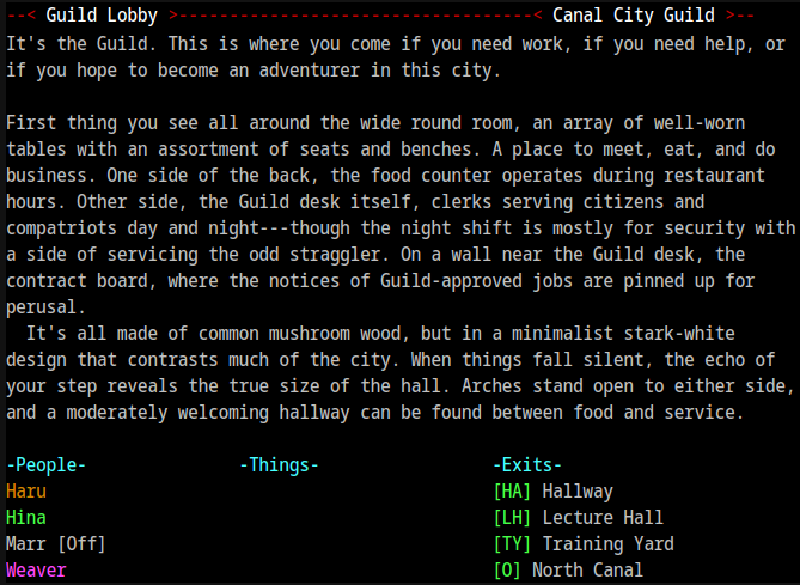
A room consists of the following parts:
-
Room Name: “Guild Lobby” in our example. This is the name of the location.
-
Room Tag: “Canal City Guild” here. This will be the name of the “zone,” or group of rooms, that you’re currently in. If it’s an OOC room the tag will always be “OOC”.
-
Zone Description: Separated from the room description by a blank line, this is usually a one-sentence description of the area you’re currently in. Optional.
-
Room Description: The description sets the stage for any scenes taking place within them. These are meant to be descriptive enough to allow for anyone to start roleplay in this area. They may change as events happen and the story unfolds, whether that’s a building burning down or just a change in the non-player characters around. Ongoing events may even be noted.
-
Player List: In this example, the user is playing Haru. You are always color-coded in orange. Hina is an online player, Marr is an offline player, and Weaver is a developer. Player characters are green, and should be treated in character when in IC areas. Staff are yellow, cyan, or magenta depending on type; despite having character profiles they are never in character. Colors get darker when the users are idle, and everyone is gray when offline.
«Do we want to use ‘helpers’? They have dark blue names. I don’t know what their role would be. Would they be IC?»
-
Things or Item List: This lists interactable objects within the room, as well as items that can be picked up.
-
Visible Exits: These are ways you can “go” to get to other rooms. The network of rooms that you can travel along is called the “grid.” You can take an exit by typing the exit name (e.g.
lecture hall) or by using the shortcut listed in []’s (e.g.lh). Often other obvious names will be available (e.g.hall), but these are guaranteed to work.
Note
The “outdoor” portion of the grid uses cardinal directions like north and southwest in its connections, though they will usually be labeled things like [SW] Exbow District. Buildings and other “inside” locations are linked using exits like [GU] The Guild, as are connections inside those “subgrids.”. You can always get back to the outdoor grid by going [O] Out some number of times. You can also get back to the start point of the game world with the command +ooc.
Interacting with Others #
Note: For input to most of these commands, the majority of visible characters will work. However, there are some special characters that do something other than simply display, like % or |. For these characters, you need to ’escape’ them for them to show up, usually by adding another % or | in front of them. If your text comes out oddly, this might be the cause! There are also non-visible characters that can perform some advanced features. These will be covered under the ‘spoof’ section where they are most commonly used.
Collaborative storytelling is all about the collaborative part, so once you know how to locate where you are in the world, next is how do you interact? The key commands for this are say, pose, spoof, and the channel system. For these examples, we will assume your character name is “Matilda”!
Say #
Say is the basic method of interacting. It will take the text you give it, throw quotation marks around it, and prepend your character name and “says,” like the following example:
say Beef is great!Matilda says, “Beef is great!"
This is a bit limited, although you can add in addition double quotes to add some action into the result:
say Beef is great!" She shuffles her feet, "But I guess salad is good, too!Matilda says, “Beef is great!” She shuffles her feet, “But I guess salad is good, too!"
Notice that the beginning and ending double quotes are added automatically!
You can use the shortcut " instead of the word say for this command as well.
Pose #
Posing doesn’t automatically assume that you’re starting out with something being said, instead, it just prepends your name to an action, hence ‘posing’ being more of something you do, versus something you say. Pose can be used in the following way:
pose shifts idly from one foot to the next.Matilda shifts idly from one foot to the next.
You can add quotes into this line as well, to add a whole paragraph of action with speech!
pose sighs softly, "You know, I'm not sure this is a good idea." There's the faint forming of a tear in Matilda's eye when this is said. "It could end like my father did…"Matilda sighs softly, “You know, I’m not sure this is a good idea.” There’s the faint forming of a tear in Matilda’s eye when this is said. “It could end like my father did…"
Notice that pose does not assume the first or last character being a double quote!
You can use the shortcut : instead of the word pose for this command as well.
Tip
No-Space Pose: You can actually get rid of that space following your character’s name by using ; instead of : in case you wanted to start your sentence with something like “Matilda’s eyes…”. It just becomes ;'s eyes…!
Spoof #
Spoofing is the act of placing text down that isn’t inherently attached to your character. This can be useful to start your writing with your character’s name in the middle, or if you’re running a scene and are including other characters that aren’t controlled by other players in it. Spoof will append your character’s name at the end of it, to prevent it from being used to ‘assume’ some other player did something when it wasn’t them. You can spoof with the spoof command, like so:
spoof It was a dark, stormy night while Matilda sat near the window, watching the rain slowly drip towards the sill outside.It was a dark, stormy night while Matilda sat near the window, watching the rain slowly drip towards the sill outside. (Matilda)
You can use the shortcut sp instead of the word spoof for this command as well.
Special Formatting #
Used primarily with Spoof, but it can actually be snuck into quite a few places such as a description, pose, or even a say command, are special formatting characters. These can add carriage returns, tabs, and extra space when interpreted by the game.
-
|/or%r: Newline or Carriage Return, ends the line and starts a new line immediately afterwards. Note: This doesn’t do anything insay. -
|-or%t: Tab, adds in a tab space where placed. Most often used for paragraph breaks. -
|_or%b: Space, adds a space, most often used at the beginning of a line when less space than a tab is needed and before text that will allow multiple spaces between characters.
You can also add color to your text! But this is an advanced topic for later.